Executive verdict (for marketing teams)
Choose Webflow if your priority is faster publishing, lower maintenance overhead, and a site your marketing team can operate without routine developer involvement. Choose WordPress if you need complex, high-volume editorial workflows, deep programmatic publishing, or a highly customised extension stack, and you're prepared to run the disciplined technical governance that comes with it.
Neither platform is universally better. The question is which one fits how your team actually works.
Stop signs for Webflow:
- You publish hundreds of articles per month across multiple contributors with multi-stage editorial approval workflows
- You need complex subscription commerce, marketplace functionality, or deep ERP/PIM integration out of the box
- Your content strategy depends heavily on programmatic, database-driven page generation at very large scale (100,000+ URLs)
Stop signs for WordPress:
- Your marketing team needs to publish and iterate independently without raising a ticket or waiting for a developer
- You want predictable hosting performance without managing PHP versions, caching layers, or server configuration
- Security governance and compliance demand a managed environment where the attack surface is minimised by default
The decision criteria that matter to growing B2B teams
Most Webflow vs WordPress comparisons focus on features. That's the wrong lens. For a growing B2B marketing team, the question is: which platform supports your operating model over the next two to three years?
The criteria that actually drive platform outcomes for B2B marketing teams are:
Use this as a scorecard (rate your current situation 0–5 for each criterion, then rate how each platform addresses it). Where your scores diverge most is where your platform decision should focus.
Performance and Core Web Vitals: what to measure, and what actually drives outcomes
What Core Web Vitals actually are
Google's three Core Web Vitals are user-centric performance metrics. According to the HTTP Archive Web Almanac (2024), they measure:
- LCP (Largest Contentful Paint): loading performance. Good threshold: under 2.5 seconds.
- INP (Interaction to Next Paint): interactivity responsiveness. Good threshold: under 200 milliseconds. INP replaced FID as the third metric in March 2024.
- CLS (Cumulative Layout Shift): visual stability. Good threshold: under 0.1.
Field data (real user measurements collected via Chrome UX Report) matters more than lab data for SEO purposes. PageSpeed Insights shows both; Google Search Console shows only field data at scale, making it the better monitoring tool for tracking template-level regressions across large sites.
How each platform affects these metrics in practice
Webflow's Designer produces clean, structured HTML and CSS by default. Class naming stays organised. Pages are served over Webflow's global CDN with HTTP/2+ delivery, automatic image optimisation, and built-in SSL. With a well-built Webflow site, you typically start from a strong performance baseline without infrastructure work.
Where Webflow sites degrade: excessive third-party script embeds, poorly implemented custom code, and large uncompressed video or animation assets. These aren't platform failures; they're implementation choices that teams need to govern actively.
WordPress can absolutely pass Core Web Vitals, but the outcome depends on the full stack. A well-configured setup with a performant block-first theme, server-side caching, a CDN, deferred non-critical JavaScript, and modern image formats can be just as fast. The problem is that this configuration takes deliberate effort and ongoing discipline to maintain. Plugin accumulation is the main enemy: each new plugin can introduce render-blocking scripts, additional database queries, or conflicting CSS that progressively degrades performance.
Practical measurement plan for either platform:
- Run PageSpeed Insights monthly on your 5 highest-traffic templates (not just the homepage)
- Monitor Core Web Vitals by URL group in Google Search Console to catch template-level regressions
- Set up real-user monitoring in GA4 using the Web Vitals JavaScript library to capture field data from actual visitors
- Run pre-launch and post-launch WebPageTest reports on migrations to verify no regression was introduced
Security and maintenance overhead: the real operational cost
The WordPress security landscape in 2026
Patchstack's State of WordPress Security in 2026 report documented 11,334 new vulnerabilities in the WordPress ecosystem in 2025, a 42% increase compared to 2024. The majority of these vulnerabilities originate in plugins, not in WordPress core itself. This is important context: a tightly governed WordPress installation with a minimal, well-maintained plugin set carries a very different risk profile than a site with 40+ plugins installed over several years by multiple hands.
Mitigation is possible and well-understood:
- Keep plugins to the minimum needed and audit the list quarterly
- Use a Web Application Firewall (WAF) with virtual patching (Patchstack, Cloudflare, or equivalent)
- Enable two-factor authentication (2FA) on all admin accounts, or SSO where available
- Test updates on a staging environment before deploying to production
- Restrict admin-area access by IP where feasible
The honest cost of this mitigation: roughly 3–6 hours per month for a disciplined, medium-sized WordPress site. That's a real operational overhead that should appear in any TCO model.
Webflow's managed security model
Webflow removes the PHP and MySQL layer entirely, which eliminates the most common WordPress attack vectors. Platform-level security updates happen without your involvement. You still need to manage API key hygiene, access control for editors, and any custom code embeds, but the ongoing burden is materially lower.
On Enterprise plans, Webflow adds SSO integration and audit log capabilities, which matter for compliance-conscious B2B teams or those operating under data governance requirements (Webflow Help Centre, updated July 2026).
Maintenance budget model (hours per month, typical B2B site)
The gap is smaller if your WordPress hosting provider handles updates and monitoring. The gap widens as plugin complexity increases.
Team workflow and governance: roles, approvals, and auditability
Why governance matters more than editing features
For B2B marketing teams, the real governance question isn't "can my editor change the homepage?" It's "what happens when they change the wrong thing, and how do I find out?" Broken design systems, unauthorised template edits, and untracked content changes are common failure modes on fast-moving teams.
How each platform handles this
WordPress has a built-in roles system (Administrator, Editor, Author, Contributor, Subscriber) and supports custom roles via plugins. Granular audit logging, approval workflows, and change tracking require additional plugins such as WP Activity Log or PublishPress. This is workable, but it's another dependency to maintain and another surface for configuration drift.
Webflow separates Designer access from Editor access at a platform level. On higher-tier plans, Workspaces allow more structured access control. On Enterprise, this extends to custom roles, SSO integration (including SCIM provisioning), and audit log capabilities, meaning you can see who changed what and when, without a third-party plugin.
Triggers for when Enterprise-level controls become necessary:
- Your team includes more than 5 content contributors or spans multiple departments
- You operate under compliance requirements (GDPR data processing records, SOC 2, ISO 27001 alignment)
- You need to restrict which editors can publish vs. which need approval before going live
- You're managing brand-critical pages (pricing, careers, homepage) where unauthorised changes carry real commercial risk
Editing experience and design system scale
Webflow's CMS Collections and component strategy
Webflow's scaling mechanism is the combination of CMS Collections and reusable Components. Collections define structured content models (blog posts, case studies, team members, product pages) with typed fields, which means editors can only enter data in the formats the template expects. Components are the design-system layer: a change to a component propagates across every instance automatically.
This architecture keeps visual consistency as teams grow. Editors work in a simplified, code-free environment; they can update text, images, and CMS entries without touching the underlying design. The separation of content-editing from design-editing is meaningful governance in practice.
WordPress's block-first approach and the discipline it requires
Gutenberg has matured considerably. With a block-first theme, custom block library, and disciplined use of reusable patterns, WordPress can support a coherent design system. When set up correctly from day one, it's genuinely powerful.
The discipline required is real, though. Mixing multiple page builders, allowing shortcode-based plugins alongside block content, or permitting inline styling creates technical debt that compounds quickly. The most effective WordPress implementations enforce a strict rule: one canonical way to build each content type, enforced through training and access control, not just documentation.
Design tokens and reusable patterns matter for consistency as teams grow on either platform. On Webflow, the architecture enforces this by default. On WordPress, it requires active product thinking and governance from the outset.
SEO, schema, and internationalisation: where B2B sites trip up
Technical SEO controls
Both platforms can support strong technical SEO. The difference is operational reliability.
Webflow handles meta tags, canonical tags, robots directives, Open Graph, and CMS-driven SEO templates natively. Redirects are built into the Webflow dashboard with support for pattern-based rules, which significantly reduces the risk of human error during migrations. Sitemaps update automatically as content changes.
WordPress with Rank Math or Yoast gives comparable control over metadata, sitemaps, and schema. The risk comes from plugin interactions: two SEO plugins outputting conflicting canonical tags, a caching plugin suppressing sitemap updates, or a theme injecting its own schema markup alongside the plugin's output. These are solvable, but they require active QA to catch.
Schema and structured data
For B2B sites, schema matters for FAQ, How-to, Product, and Organisation markup, all of which influence rich results and AEO (Answer Engine Optimisation) visibility. Webflow supports custom schema via HTML embed components, which gives full flexibility but requires manual implementation. WordPress SEO plugins handle common schema types automatically, with customisation available via filters.
Neither platform offers a clear winner here; both require intentional implementation. WordPress has slightly more mature tooling for automated schema injection across content types.
Internationalisation and localisation workflows
Webflow supports multilingual setups natively (on supported plans) with hreflang tag implementation and per-locale SEO settings. CMS Collections can carry translated content with consistent templates. This is suitable for most B2B sites operating in 2–5 languages with moderate content update frequency.
WordPress with WPML or Polylang offers more mature localisation tooling for complex multilingual setups: fine-grained translation management, multi-currency, regional content variants, and advanced hreflang configurations. The trade-off is added QA overhead and potential performance impact if not carefully configured.
Questions to answer before choosing your localisation approach:
- How many languages or locales do you need to support?
- How frequently does content update, and who manages translations?
- Do different locales need different content models (not just translated copy)?
- Who owns hreflang implementation and ongoing validation?
If your answers involve 2–3 languages with relatively stable content and a small team, Webflow handles this cleanly. If you're managing 5+ locales with frequent updates and regional editorial teams, WordPress's plugin ecosystem likely gives you more control.
Cost and limits in 2026: the part most comparisons skip
Webflow pricing and CMS limits (May 2026 update)
Following Webflow's pricing update in May 2026, the standard site plan is now $25/month (billed yearly) or $39/month (billed monthly), per the Webflow Help Centre. The same update increased the CMS item allowance from 10,000 to 20,000 items on standard plans.
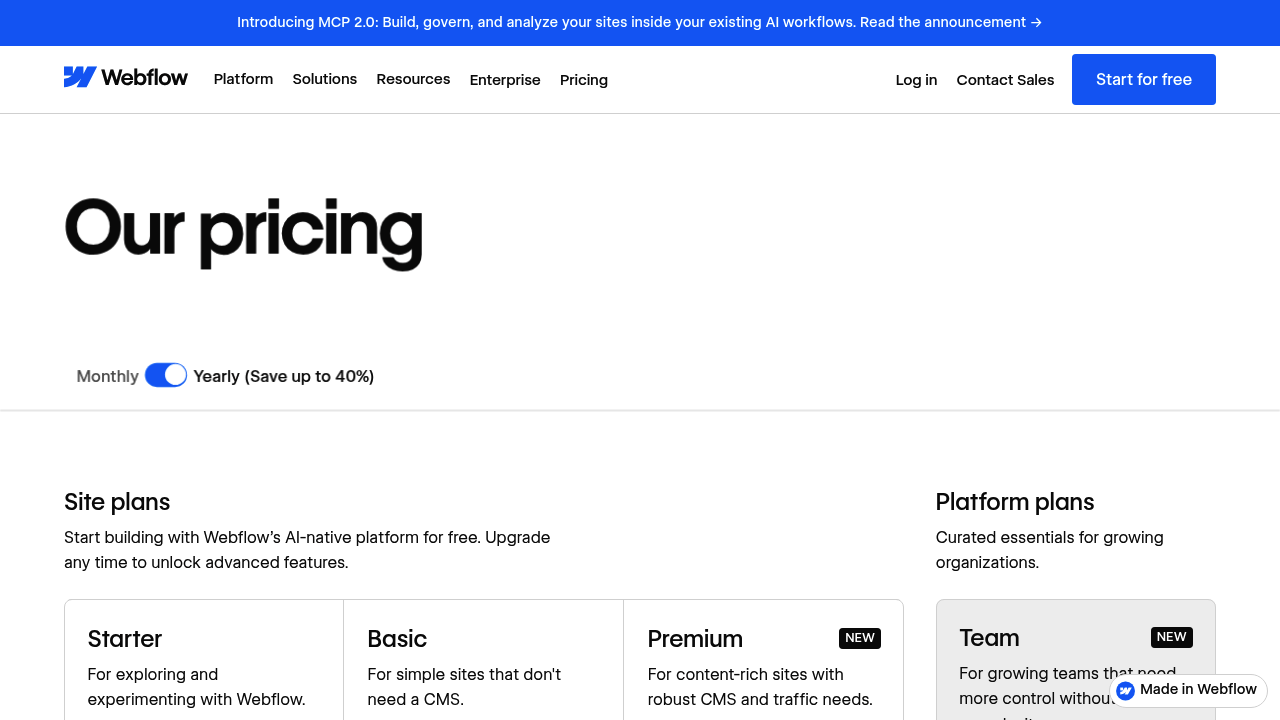
For most B2B marketing sites (blogs, case studies, team pages, resource libraries), 20,000 CMS items is more than sufficient. It becomes a constraint for programmatic SEO plays, large product catalogues, or publication-style archives.
What can cause unexpected Webflow cost increases:
- CMS item growth beyond plan limits (upgrade required)
- Form submission volume exceeding plan allocation
- Bandwidth and traffic thresholds on lower-tier plans
- Adding localisation or multiple sites (each site requires its own plan)
- Moving to Enterprise for SSO, audit logs, or custom roles
WordPress true cost model
WordPress core is free and licensed under GPLv2 (or later). The actual cost sits in what surrounds it.
Three-year TCO model structure
A meaningful TCO comparison should account for four components:
- Build and migration cost: One-time investment to design, build, and migrate content and redirects
- Ongoing ops cost: Hosting, licences, developer maintenance, security tooling (annualised)
- Speed-to-publish opportunity cost: How much revenue-generating activity is delayed per month because publishing requires developer involvement? At even €6,000/month of marketing team capacity, a 20% delay cost compounds quickly
- Risk cost: What's the financial exposure from a security incident, a Core Web Vitals drop affecting organic traffic, or a failed plugin update taking the site down?
For most B2B SMEs and scale-ups, Webflow's lower ongoing ops cost and faster self-serve publishing make the three-year TCO competitive or favourable, even accounting for a higher initial build investment.
E-commerce and lead-gen B2B: don't compare the wrong thing
Most B2B marketing teams don't need complex commerce. They need lead generation, content, and conversion, which changes the comparison entirely.
For lead-gen and content-marketing sites, both platforms are capable. The real question is publishing speed and governance, not payment gateway counts.
For B2B teams that do need some e-commerce (events ticketing, digital products, simple service packages), Webflow Commerce handles this cleanly: Stripe-based payments, Apple Pay, Google Pay, and a fully customisable checkout experience without plugins.
WooCommerce becomes the right choice when you need: subscriptions, complex multi-currency logic, marketplace functionality, regional payment gateways, or deep ERP/PIM integration. It can do all of this. But each capability comes through an extension, and each extension adds operational overhead. Cumulative plugin management is a real cost that should be modelled explicitly.
Headless and future-proofing: when to decouple
Most B2B marketing teams should not be considering headless. The operational overhead of managing a decoupled front end (separate deployment pipeline, CI/CD, hosting, observability) is significant and rarely justified unless you have a dedicated engineering team and a clear need.
When headless is genuinely worth it:
- You're delivering content to multiple channels simultaneously (web, app, digital signage, partner API feeds)
- Your front end requires app-like interactivity that a traditional CMS-rendered page can't deliver
- You have an engineering team comfortable managing Next.js or Remix deployments and infrastructure
Platform approaches:
Webflow's API and CMS are usable in a headless configuration, with content served via Webflow's hosted API. This works well as a managed content layer feeding a custom front end, without the overhead of self-hosted WordPress infrastructure.
WordPress via its REST API or WPGraphQL is the more established headless CMS option, with a larger ecosystem of tools, starter kits, and agency expertise. If you're already on WordPress and need to decouple, this is the natural path. The trade-off is you're now responsible for the entire front-end infrastructure stack.
For most B2B teams, the right answer is a well-governed traditional deployment on either platform. Reserve the headless conversation for when you have a genuine multi-channel or application requirement.
WordPress to Webflow migration: a risk checklist
Migrations fail in predictable ways. Most SEO damage from platform migrations is preventable with a structured approach.
SEO protection checklist
- Full site crawl before migration to export all live URLs, status codes, internal links, canonicals, and existing schema
- Complete URL mapping: every old URL mapped to its new equivalent (or to a logical redirect destination)
- Pattern-based 301 redirect rules configured in Webflow before DNS switch
- Metadata parity check: page titles, meta descriptions, Open Graph tags, and canonical tags replicated at both page and template level
- Schema markup validated on key templates (homepage, service pages, blog post template) using Google's Rich Results Test
- Pre-launch staging crawl using Screaming Frog or Sitebulb to verify redirect chains, catch orphaned pages, and confirm no 404s on high-value URLs
- Post-launch Google Search Console monitoring: coverage report, Core Web Vitals, and manual inspection of top organic landing pages within 48 hours of DNS switch
Operational checklist
- Content model alignment: WordPress post types and custom fields mapped to Webflow CMS Collections with appropriate field types
- Content migration via structured CSV or Webflow API (not manual copy-paste)
- Redirect QA: test a representative sample of 301s using a browser redirect checker before launch
- Internal links updated to new URL structure within migrated content
- Rollback plan documented: at minimum, DNS TTL lowered before migration so reversion is fast if needed
What can break (and how to catch it)
At Groove Digital, our migration process includes structured 301 redirect implementation, pre and post-launch crawl validation, and content model alignment as standard. The goal is to rebuild the site as a system that performs better than the original, not just replicate what existed before.
Decision matrix: match platform to B2B scenario
If your situation maps to the Webflow column and your current WordPress site is creating publishing friction, maintenance overhead, or performance issues, a structured migration is likely worth modelling. The question is whether the three-year ops savings and publishing velocity gains justify the migration investment.
Groove Digital's Sprints and Recipes™ framework (Brand Sprint, Design Sprint, Build Sprint) is built specifically for this: a structured path from assessment to live site, with governance and content model design built in from day one, not retrofitted.
FAQ
Can I keep my CMS data and structures when migrating?Your content can be exported from WordPress (XML or direct database export) and restructured for Webflow CMS Collections via CSV or API import. Content models rarely map directly, so plan for a structured content modelling exercise before migration. This is where most teams underestimate the time required.
Do both platforms support multilingual content?Yes, though with different approaches. Webflow supports multilingual natively on supported plans with hreflang and per-locale settings. WordPress supports multilingual via plugins (WPML, Polylang), which offer more depth for complex setups but add maintenance overhead. For 2–4 languages with moderate update frequency, Webflow handles this cleanly. For 5+ locales with regional editorial teams, WordPress's plugin ecosystem is generally more mature.
Is Webflow better for SEO than WordPress?Neither platform is inherently better for SEO. Both can achieve strong technical SEO outcomes. Webflow makes it easier to maintain SEO stability over time (native redirects, automatic sitemaps, clean code output by default). WordPress requires more active plugin management and QA to avoid configuration drift, but gives more control for advanced implementations like automated schema injection across content types.
Does WordPress require more maintenance than Webflow?Yes, materially so. Patchstack reported 11,334 new WordPress ecosystem vulnerabilities in 2025 alone, the vast majority in plugins. A disciplined WordPress operation requires 7–13 hours per month in updates, security monitoring, regression testing, and hosting management for a typical B2B site. A comparable Webflow site requires 3–5 hours, with platform-level security handled by Webflow.
How long does a migration take, and what downtime is typical?A structured WordPress to Webflow migration for a typical B2B site (50–200 pages) takes 6–12 weeks depending on content complexity, the number of redirects, and whether the content model needs redesigning. With proper DNS preparation (lowering TTL, staging site validation), the actual DNS cutover window is typically under 15 minutes with near-zero visible downtime. The SEO risk window is the first 2–4 weeks post-launch, when Google processes the redirect signals; monitoring Search Console daily during this period is non-negotiable.
How Groove Digital delivers fast, scalable Webflow builds
High-performing websites are built for continuous improvement, not one-time launches. At Groove Digital, we structure Webflow builds for experimentation from day one: A/B testing capability, controlled rollouts, and scalable content operations. Analytics is implemented with clear measurement frameworks, event taxonomy standards, and server-side tagging where needed.
Every component is tested for responsiveness, accessibility (WCAG compliance), and performance. We validate Core Web Vitals using both lab and field data, and maintain regression checks across key templates to prevent degradation over time. Governance is designed to protect the design system while still giving editors the independence to publish without raising a ticket.
If you want Webflow's speed and flexibility combined with structured CRO, SEO, and migration expertise, see how Groove Digital helps B2B teams launch faster and operate smarter.
Webflow vs WordPress isn't about which platform wins on features. It's about which one fits how your team operates over the next two to three years.
Webflow reduces operational overhead and speeds up delivery for most marketing and brand-led B2B websites. WordPress is the stronger choice for content-heavy publishers and complex commerce setups, provided you invest in the technical discipline it requires.
The best platform is the one that removes friction from your team's daily work, lets you publish and experiment without constant developer dependency, and stays stable and secure without consuming disproportionate operational time. Choose based on that, not on feature lists.